11 Visual Planning Strategies for Clarity
- Time Blocking for Creatives? The Visual Day Planner You'll Love
- 1. Mind Maps
- 2. Kanban Boards
- 3. Calendar Blocking
- 4. Gantt Charts
- 5. Priority Matrices
- 6. Color-Coded Task Systems
- 7. Timeline Roadmaps
- 8. Weekly Planning Boards
- 9. Habit Tracking Grids
- 10. Layout-Based Daily Dashboards
- 11. Voice-to-Visual Planning Systems
- Quick Comparison Table: Which Visual Planning Method Fits Your Brain?
- Conclusion
- FAQs
If your plan lives only in your head, it gets lost fast. I’d sum this up in one line: the best visual planning method is the one that makes your next step obvious with the least effort.
Here’s the short version of the article:
- I look at 11 visual planning methods
- Each one helps with a different problem: idea dump, task order, time planning, priority, or follow-through
- The simplest tools are often the easiest to keep using
- A few numbers stand out:
- Weekly boards can be updated in 5–10 minutes per week
- Priority matrices work well for about 10–30 tasks
- Color systems work best with 4–6 colors
- Daily dashboards should leave 20%–30% open for surprises
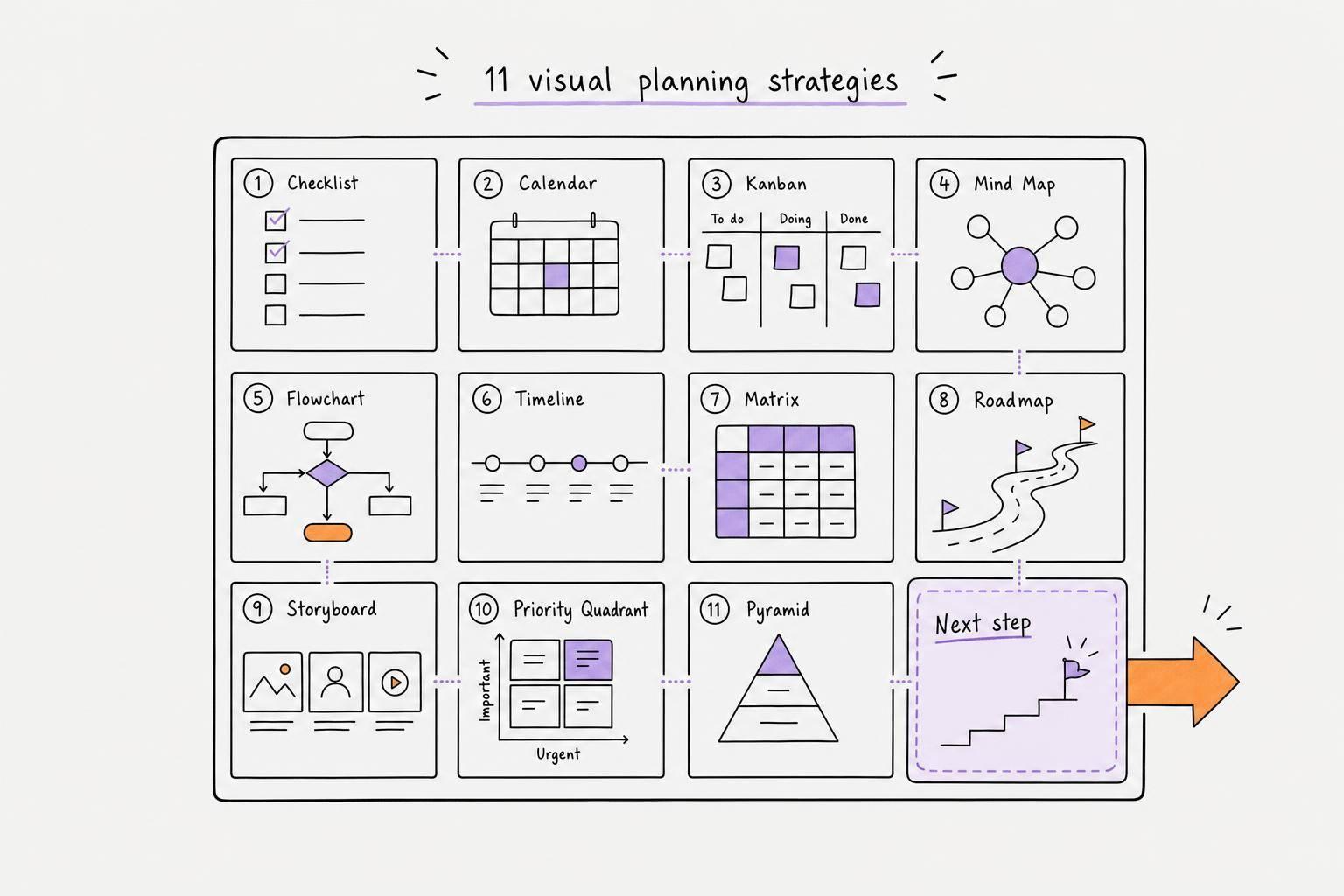
The 11 methods covered are:
- Mind Maps for early thinking
- Kanban Boards for task status
- Calendar Blocking for time planning
- Gantt Charts for linked project steps
- Priority Matrices for choosing what matters first
- Color-Coded Task Systems for fast scanning
- Timeline Roadmaps for milestone order
- Weekly Planning Boards for a 7-day view
- Habit Tracking Grids for routines
- Layout-Based Daily Dashboards for today’s plan
- Voice-to-Visual Planning Systems for spoken idea input
What I like about this list is that it doesn’t treat every planning problem the same. A long project, a packed day, and a habit streak all need different layouts. That’s the point.
Quick Comparison
| Method | Best for | Time frame | Effort to keep up |
|---|---|---|---|
| Mind Maps | Brain dumps and idea links | Project start | Low |
| Kanban Boards | Tracking task stages | Weekly / live use | Low |
| Calendar Blocking | Seeing what fits in a day | Daily / weekly | Medium |
| Gantt Charts | Linked deadlines | Multiweek / multimonth | High |
| Priority Matrices | Picking what to do first | Daily / weekly | Low |
| Color-Coded Systems | Fast task scanning | Daily / weekly | Very low |
| Timeline Roadmaps | Project phases and handoffs | Monthly / quarterly | Medium |
| Weekly Planning Boards | Seeing the whole week | 7 days | Low |
| Habit Tracking Grids | Routine streaks | Monthly | Low |
| Daily Dashboards | One-page daily focus | 24 hours | Low |
| Voice-to-Visual Systems | Spoken task input | Same day | Low |
If I were starting from scratch, I’d pick just one of these based on the main problem: too many ideas, too many tasks, too little time, or trouble staying on track.
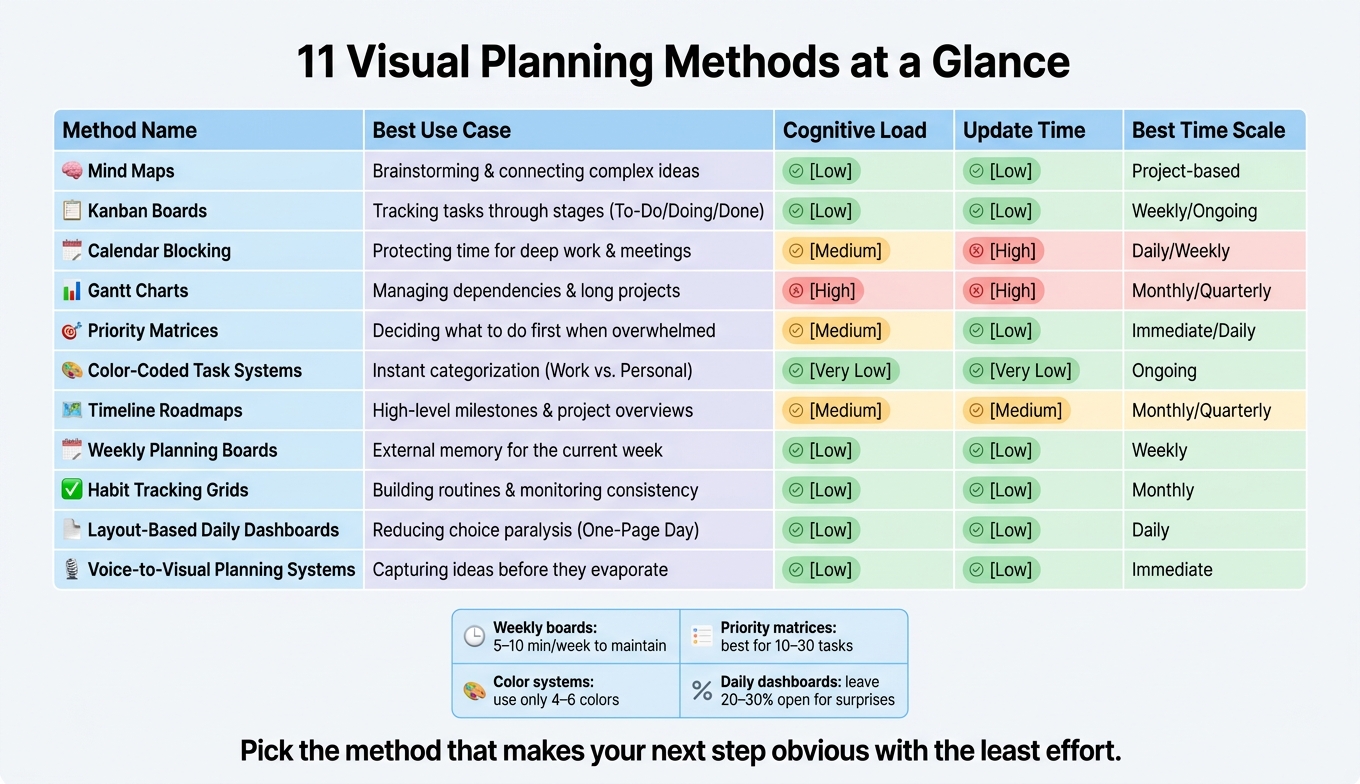
11 Visual Planning Methods Compared: Find Your Best Fit
Time Blocking for Creatives? The Visual Day Planner You'll Love
sbb-itb-1b3be24
1. Mind Maps
A mind map puts one idea in the center, then builds outward with branches, so your thoughts don’t have to fit a rigid sequence right away. That simple shift helps clear mental clutter before you decide what to do next.
Best for
Mind maps work well for brainstorming, project ideation, and breaking down complex topics before the steps are fully clear.
"When working through complex concepts, we put everything into Miro. It's like opening a 100,000-piece puzzle and sorting through it visually on a board." - Jane Ashley, Head of Design, DocuSign
Clarity payoff
Mind maps can ease decision paralysis by getting ideas out of working memory and onto a page you can see. When everything is laid out in front of you, it becomes easier to spot gaps, links, and the next move.
Setup friction
Setup friction is low. You can start with nothing more than a pen, paper, and a focus question.
Best used at the start of a project
Use mind maps early in a project, especially when the next steps feel fuzzy. Once the main branches start to make sense, move them into a more structured system built for action.
2. Kanban Boards
Once your ideas are laid out, Kanban turns them into work you can see. A Kanban board sorts tasks into columns based on status, usually To Do, Doing, and Done. You get a quick read on what’s waiting, what’s in motion, and what’s finished. That makes task status easier to scan at a glance.
The big rule here is the WIP limit. Keep Doing capped at two or three cards. If that column is full, new work waits. Simple. That helps stop a pile of half-finished tasks from fighting for your attention all at once.
Best for
Kanban boards work well for steady, multi-step work like bug tracking or content production. They’re also handy if tasks tend to disappear from your mind the second they leave your field of view. With Kanban, the work stays visible until it moves.
Clarity payoff
If one column starts overflowing, you can spot the jam right away. No meeting, no Slack check-in, no mental detective work. You can see where tasks are getting stuck, which cuts down the strain of trying to track everything in your head.
Setup friction
A sticky-note board takes just a few minutes to put together. Digital boards can add automation and other views, which is nice when your workflow starts getting a bit more busy.
Ideal planning horizon
Kanban works best as a live view for day-to-day execution and weekly planning. It’s a good fit when you need current status in front of you, not a fixed calendar plan.
3. Calendar Blocking
Calendar blocking breaks your day into visible chunks for specific tasks or parts of life, so you can see what actually fits. If Kanban shows what needs to get done, calendar blocking shows when it will happen. It works well when the work itself is clear, but your day keeps getting stuffed past its limits.
The biggest plus is the visual layout. You can estimate how long something may take and spot clashes much faster. One quick look often tells you when the plan is bigger than the hours you have.
To keep the calendar easy to scan, add buffer space between blocks and keep your color system small. A good rule of thumb is to stick to 4–6 categories so the view doesn't turn into a rainbow mess.
Best for
People who lose track of time, say yes to too much, or shut down when a long task list hides the limits of the day.
Clarity payoff
It makes packed days obvious before they happen. That cuts down on guesswork, which helps when time feels fuzzy or hard to measure.
Setup friction
Low to moderate: pick a color key, then reset it each day or week so the schedule stays up to date.
Ideal planning horizon
It fits best with daily and weekly planning, where you can line tasks up with your time and energy.
4. Gantt Charts
When a project has fixed milestones and linked steps, it helps to stop thinking in terms of simple calendar slots and start thinking in terms of dependencies.
A Gantt chart lays out a project on a horizontal timeline, with each task shown as a bar from start to finish. It works best when the order of tasks matters and one step can’t begin until another one ends. You can see how work connects across weeks or months at a glance. That’s where Gantt charts pull ahead of simple time blocks: (a common way to plan your day with ADHD) they make it easy to spot how one delay can throw off the rest of the project.
The big payoff is the critical path - the chain of tasks that controls the project’s finish date. If one deadline slips, the effect moves forward through the schedule, and a Gantt chart makes that visible before it turns into a crisis.
That said, Gantt charts get messy fast when people pack in too much detail. Keep them focused on milestones and only the dependencies people need to see. If someone needs more than 10 seconds to read the chart, it’s probably too crowded.
Use this only when the sequence of work matters more than fast day-to-day task updates.
Best for
Teams running complex, deadline-driven projects with fixed start and end dates and multiple linked tasks - think product launches or event planning.
Clarity payoff
It makes dependencies and the critical path easy to see, so teams can catch delays earlier.
Setup friction
High, if you try to include everything. A Gantt chart needs clear start and end dates for each task to work well. For projects with flexible timelines or daily shifting work, the setup cost usually doesn’t pay off.
Ideal planning horizon
Multiweek to multimonth projects. It’s less useful for short-term, fast-moving work where priorities change day by day.
5. Priority Matrices
A priority matrix places tasks on a 2×2 grid, usually urgency vs. importance, so you can spot what needs attention first without comparing every task in your head. Unlike a timeline, this approach helps you decide what matters before you put it on the calendar. It takes the ranking process out of your mind and puts it in front of you on the page. That also helps counter the Mere Urgency Effect, which is the habit of picking urgent, low-payoff work over important work that can lead to better results. Use it when the issue isn’t time. It’s choice.
The Eisenhower Matrix sorts work into four quadrants:
- Do First: urgent and important
- Schedule: important, not urgent
- Delegate: urgent, not important
- Eliminate: neither
To keep the grid useful, aim for 3–5 tasks in the first quadrant and 3–7 in the second. If a few tasks end up in the same high-priority box, use cost of delay or impact as the tiebreaker.
Best for
People or teams sorting 10–30 competing tasks during daily or weekly planning.
Clarity payoff
It draws a clear line between low-value work and high-value work, which makes it easier to protect big-picture tasks from interruptions.
Setup friction
A 2×2 grid usually takes 5–15 minutes to fill out for 10–30 tasks. It works best when you sort items first thing, before decision fatigue kicks in.
Ideal planning horizon
Weekly planning and daily reviews. Use it as a daily or weekly snapshot. Priorities and deadlines shift, so update the matrix often.
Once priorities are clear, color-coding can make them even faster to scan.
6. Color-Coded Task Systems
Once you know what matters, color helps it stand out right away. Your brain spots color fast, so a color-coded list is easier to scan than a plain one.
Keep it simple. Use no more than 4–6 colors. Any more than that, and scanning gets slower instead of easier.
You can set up colors in two main ways. Use colors by category if you want a quick balance check across work, health, and personal tasks. Use them by priority if the main goal is knowing what to do next. If you go with priority, save the brightest, most saturated colors for high-priority items and use softer, muted colors for flexible tasks. That way, the work that matters most stays in view instead of living in your head.
A small trick helps here: write first, highlight second. If you start by writing in different colors, setup can feel like a chore. If you highlight after, you can get your tasks down fast and sort them after. Keep a color key where you can see it. And if you use both paper and digital tools, stick with the same key in both places.
Use color to mark priorities. Use timelines when sequence and due dates matter.
Best for
Adults with ADHD and visual thinkers who need an external scaffold for executive function.
Clarity payoff
At a glance, you can see what is crowding your week.
Setup friction
Low if you start with one highlighter for your most important category and expand gradually.
Ideal planning horizon
Daily and weekly views, where fast recognition matters most.
When tasks need dates and sequence, move to a timeline next.
7. Timeline Roadmaps
When color shows priority, a timeline shows order.
A timeline roadmap lays out a project’s phases, milestones, and dependencies across weeks or months. Use it when you need to see how the work fits together, not just what needs to get done.
The main win here is simple: dependencies are easy to spot. If Task B can’t start until Task A is done, that connection is clear at a glance. Timelines also make it easier to catch blocking tasks and missed handoffs early, before they turn into bottlenecks. For cross-functional teams, that shared view matters a lot. Everyone can see what’s moving, what’s stuck, and what comes next.
One practical tip: build in buffers. When you estimate task length, add a small cushion. Projects almost never move exactly as planned, and that extra room helps keep the roadmap realistic when one task slips.
Best for
Strict, multi-step projects with fixed deadlines.
Clarity payoff
Timelines make major phases, handoffs, and bottlenecks easy to scan.
Setup friction
Setup takes real work. Start with 5–10 milestones, then add tasks with clear date ranges.
Ideal planning horizon
Monthly to quarterly.
Use this for project-level planning, not daily task wrangling.
8. Weekly Planning Boards
If calendar blocking shows where your hours go, a weekly board shows whether your week can actually hold them.
It pulls the next 7 days into one clear view: priorities, time commitments, and progress. The goal is simple: see if the week is on track.
This matters because time becomes visible. Instead of carrying a mental list around all day, you can see your hours next to your commitments. A weekly board gets those thoughts out of your head, which cuts mental clutter and helps you make decisions faster. Once it's all in front of you, it's easier to spot what stays, what moves, and what needs to go.
To keep the week grounded in reality, sort work by commitment level with a Priority Pyramid. Put 1–3 non-negotiables at the top, secondary priorities in the middle, and flexible tasks at the bottom. If committed hours go past available hours by more than 20%, cut or defer lower-priority work. That kind of capacity check is tough to do in your head. On a board, it jumps out.
Best for
- High performers
- Managers buried in meetings
- Team leads keeping an eye on burnout
- Individuals with ADHD who deal with time blindness or task initiation challenges
Clarity payoff
Teams with real-time visibility into their week make 34% more decisions confidently. Scheduled focus time can also increase output quality by 47%. Just as important, the board cuts decision fatigue by putting a cap on your daily must-do list.
Setup friction
Very low. A working weekly board takes 5–10 minutes per week to maintain. The best rhythm is simple: update it on Friday afternoon to review the week, then check it again on Monday morning to lock in what’s ahead.
Ideal planning horizon
7 days. The payoff comes from keeping the board tight and current.
9. Habit Tracking Grids
When the goal is consistency rather than a one-and-done task, a habit grid makes repetition easy to see.
A habit tracking grid lets you mark each day you complete a habit. That simple act turns consistency into something visible. You’re not guessing how things are going - you can see it in seconds.
This is especially helpful for people who struggle with “out of sight, out of mind.” A grid on your wall or in your planner keeps the habit in front of you, which turns it into a cue.
Checking off a box also gives instant feedback. That small win can help reinforce the behavior, especially for people with ADHD who tend to do better with immediate feedback.
People with visible planning systems are 42% more likely to achieve their annual goals.
Best for
This works well for:
- People with ADHD or time blindness
- Anyone trying to build a new routine
- People who like streaks and visual rewards
Clarity payoff
You can spot gaps and progress across several habits at once without reading through a list. A row of checkmarks shows consistency fast, and that’s something a plain text list can miss.
Setup friction
Low to medium. The grid itself is simple to make, but sticking with it after the newness wears off can be the harder part. A good way to start is with one or two habits, then put the grid somewhere you already look every morning.
Ideal planning horizon
A monthly view or a 2- to 4-week view tends to work best. A 30-day grid gives you enough time to notice patterns without feeling like too much at once.
If your routines need a daily status view instead of a streak view, the next method makes that shift.
10. Layout-Based Daily Dashboards
If the weekly board gives you the whole week, this dashboard zooms in on today.
A daily dashboard puts today’s tasks, time blocks, and routines on a single page, so you spend less mental effort figuring out what comes next.
Why does that help? The setup leans on visual recognition and memory instead of constant reading. That puts less strain on working memory.
Best for
People with ADHD, visual thinkers, and anyone who deals with time blindness or decision paralysis.
Clarity payoff
High. The one-page limit forces you to pick clear priorities. But that only works if the layout stays small enough to update fast.
Setup friction
Low to medium. Start with a large index card or a whiteboard. Then spend 5 minutes at the end of the day clearing finished items and sketching tomorrow’s layout.
Ideal planning horizon
Keep it to a strict 24-hour window. Leave 20%–30% of the page open for surprises. That makes this the most stripped-down option on the list.
11. Voice-to-Visual Planning Systems
Most visual planning methods begin with a blank page and a clear idea. This one doesn’t. It starts with a messy thought and a quick voice note. That makes it a strong fit when your brain moves faster than your fingers.
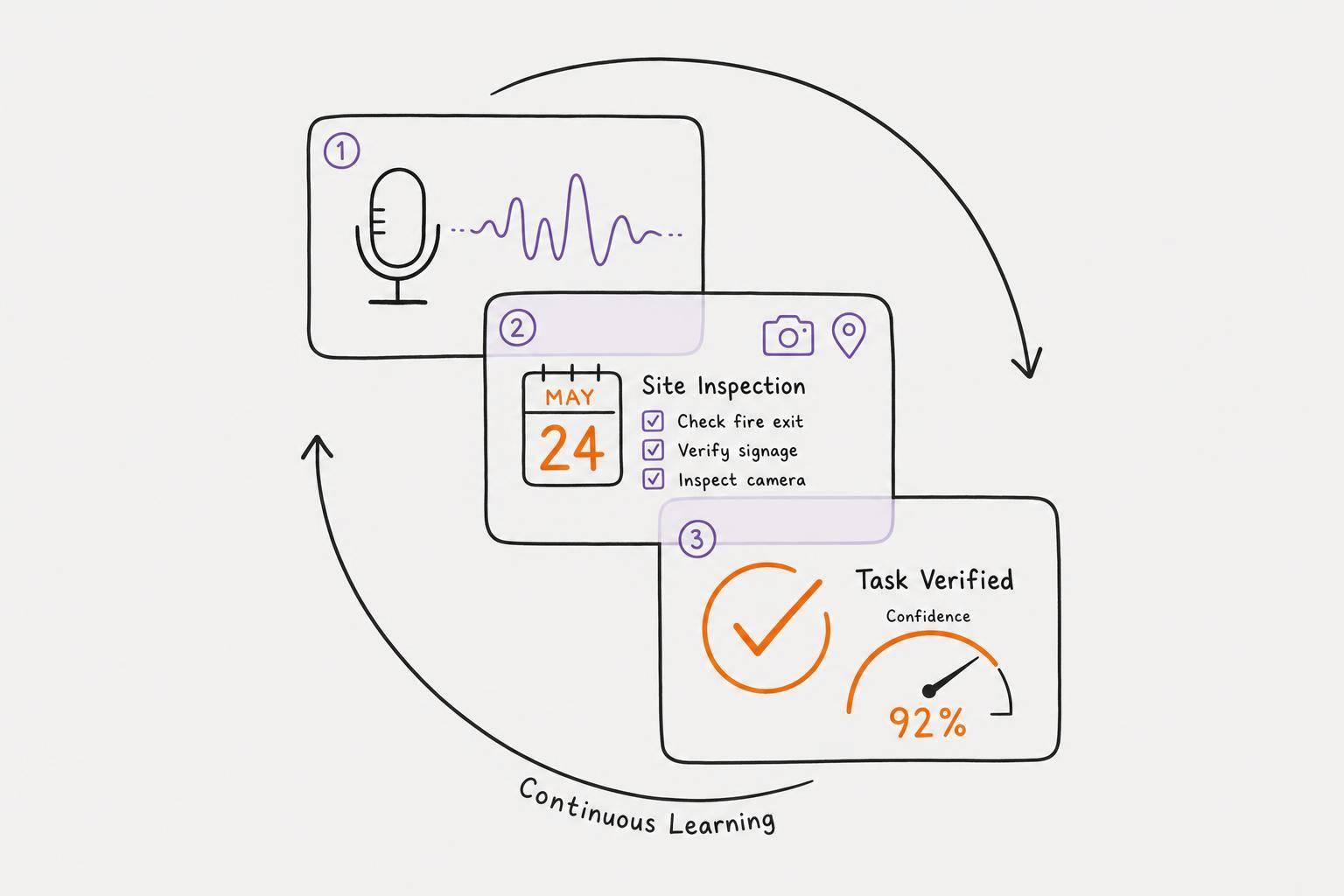
A voice-to-visual planning system lets you speak your tasks, ideas, or full brain dump out loud, then turns that audio into a structured visual plan automatically. You don’t need to retype anything. The point is simple: get ideas out of working memory and into a format you can use.
Voice capture gets ideas out fast, then AI turns them into tasks before they slip away.
"The diagram does the memory work, freeing your mind to do the thinking." - Sara de Klein, Head of Product, Storyflow
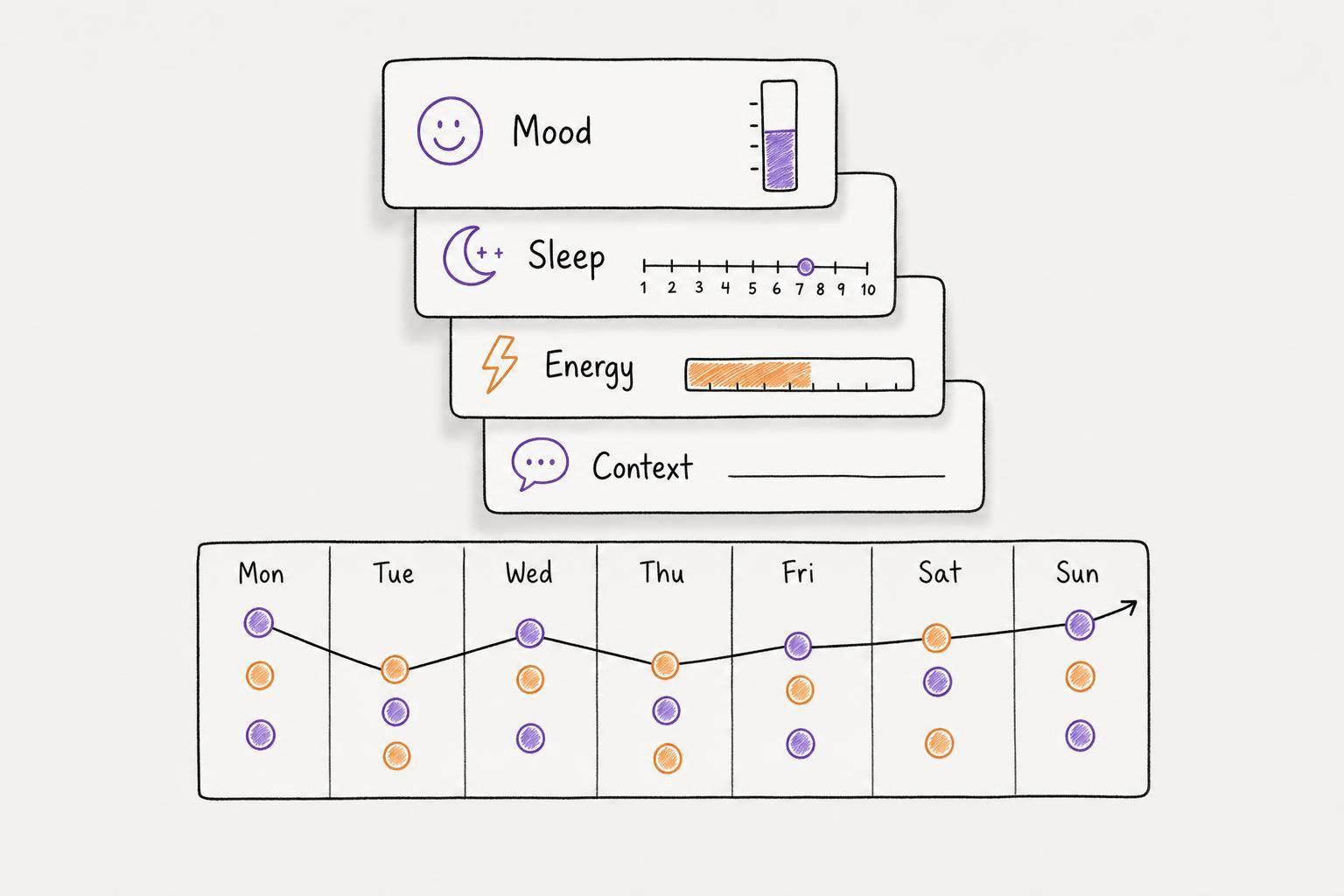
Calma is built for this workflow. It turns voice notes into prioritized tasks, due dates, journal logs, and habit grids in one minimal view.
Best for
People with ADHD, fast thinkers, and meeting-heavy professionals who need spoken decisions turned into usable tasks.
Clarity payoff
High. The AI removes the manual re-entry step and turns spoken input into a visual plan, which makes priorities easier to scan at a glance.
Setup friction
Low. The main shift is simply remembering to get thoughts out as they happen. It helps to tie the system to an anchor habit, like your morning coffee, so it becomes part of your day.
Ideal planning horizon
This works best for immediate task capture and daily planning. Use it to move what’s in your head onto a visual board, then let that structure guide the next 24 hours. If capture is the bottleneck, this is where the method shines; the table below shows how it compares with the other methods.
Quick Comparison Table: Which Visual Planning Method Fits Your Brain?
How to Read the Table
Use this table to match a method to your main bottleneck: capture, priority, time, or follow-through. The best system is the one that cuts down on thinking, not the one packed with the most features.
Choose the one you'll keep in sight and can update fast. Use the table below to narrow your options to the method that fits your current bottleneck.
Side-by-Side Method Comparison
| Strategy | Best Use Case | Cognitive Load | Update Time | Best Time Scale |
|---|---|---|---|---|
| 1. Mind Maps | Brainstorming & connecting complex ideas | Low | Low | Project-based |
| 2. Kanban Boards | Tracking tasks through stages (To-Do/Doing/Done) | Low | Low | Weekly/Ongoing |
| 3. Calendar Blocking | Protecting time for deep work & meetings | Medium | High | Daily/Weekly |
| 4. Gantt Charts | Managing dependencies & long projects | High | High | Monthly/Quarterly |
| 5. Priority Matrices | Deciding what to do first when overwhelmed | Medium | Low | Immediate/Daily |
| 6. Color-Coded Task Systems | Instant categorization (Work vs. Personal) | Very Low | Very Low | Ongoing |
| 7. Timeline Roadmaps | High-level milestones & project overviews | Medium | Medium | Monthly/Quarterly |
| 8. Weekly Planning Boards | External memory for the current week | Low | Low | Weekly |
| 9. Habit Tracking Grids | Building routines & monitoring consistency | Low | Low | Monthly |
| 10. Layout-Based Daily Dashboards | Reducing choice paralysis (One-Page Day) | Low | Low | Daily |
| 11. Voice-to-Visual Planning Systems | Capturing ideas before they evaporate | Low | Low | Immediate |
For low-energy days, start with the simplest layouts. If your energy is down or your attention moves around a lot, begin with Color-Coded Task Systems, Habit Tracking Grids, or Layout-Based Daily Dashboards.
Gantt Charts and Calendar Blocking can work well for more involved plans, but they ask for more upkeep.
Conclusion
Choose the method that fixes your main bottleneck: capture, priority, time, or follow-through. These 11 strategies are tools, not a checklist. Pick one or two that make your next step obvious.
Start Small and Keep It Visible
Start with one system you can see and use it for a week or two. One Kanban board or a one-page daily layout is enough. Miss a day? Just pick it back up where you left off.
Once the system is in front of you, the next job is simple: make updates easy.
Pick Tools That Are Easy to Update
A visible system only helps if it stays easy to maintain. A tool you’ll use beats a “perfect” setup you drop after three days. Go with tools that are simple to update, like drag-and-drop boards, index cards, or voice-first apps. If updating starts to feel like a chore, cut the system down instead of walking away from it.
If speaking feels easier than typing, Calma fits that style. It turns voice notes into prioritized tasks, journal logs, and habit grids in a minimal interface built to reduce cognitive load.
Success here is pretty simple: you can see your next step at a glance.
FAQs
How do I choose the right visual planning method for me?
Choose the method that feels easiest to use and matches how your brain works. Try it for a week or two. Keep what helps. Drop what doesn't. The point is to build a system you can come back to without a lot of friction, not one that falls apart the second life gets messy.
For daily focus, a one-page plan or Eisenhower Matrix can work well. For project tracking, try a Kanban board or a timeline. For complex ideas, use a mind map. If you have ADHD, Calma can help cut mental overload with voice-to-task capture and smart prioritization.
Can I combine more than one planning method?
Yes - visual planning is personal, so it makes sense to mix methods, layouts, colors, and tools until you land on a setup that fits the way you think.
A hybrid setup often works well. For example, you might use a large wall calendar to see the big picture, then rely on digital tools for day-to-day scheduling.
The easiest way to start is simple: pick one method and use it for a few weeks. Then layer in other tools if you need them, so your system stays easy to keep up with.
What should I do if I stop updating my system?
If you stop updating your system, don’t take it as a personal failure. And don’t let it knock you out of planning mode. Treat it as a simple signal: time for a reset.
One easy fix is an end-of-day visual reset. Clear out finished items, move unfinished tasks to the next day, and sketch out what tomorrow looks like. It only takes a few minutes, but it helps keep your system current.
That matters more than it seems. Once your system gets stale, planning starts to feel sticky. Old info creates friction, and the whole process becomes harder to trust. If keeping everything up to date by hand feels like a chore, Calma can take some of that weight off.