Voice Planning vs Typing: Which Works for ADHD?
When it comes to planning with ADHD, voice and typing methods each have their strengths. Here's the key takeaway: Voice planning works faster and aligns better with ADHD brains, while typing provides structure and precision for detailed tasks.
Quick Overview:
- Voice planning: Great for fast-moving thoughts, reduces mental effort, and captures ideas quickly. Ideal for brainstorming or on-the-go planning using ADHD task management apps.
- Typing-based planning: Slower but helps organize thoughts, refine details, and create structured plans. Useful for tasks needing precision.
For best results? Many people find a hybrid approach works: use voice for quick idea dumps and typing to refine and organize.
Quick Comparison:
| Factor | Voice Planning | Typing-Based Planning |
|---|---|---|
| Speed | 120–150 WPM | 38–40 WPM |
| Effort | Low | High |
| Focus Fit | High | Low |
| Error Rate | Lower (1.5 avg.) | Higher (2.9 avg.) |
| Best Use | Quick notes, ideas | Detailed, structured tasks |
Pro Tip: Try apps like Calma that support both methods, letting you switch based on your needs. Test their free trial to see what works best for you.
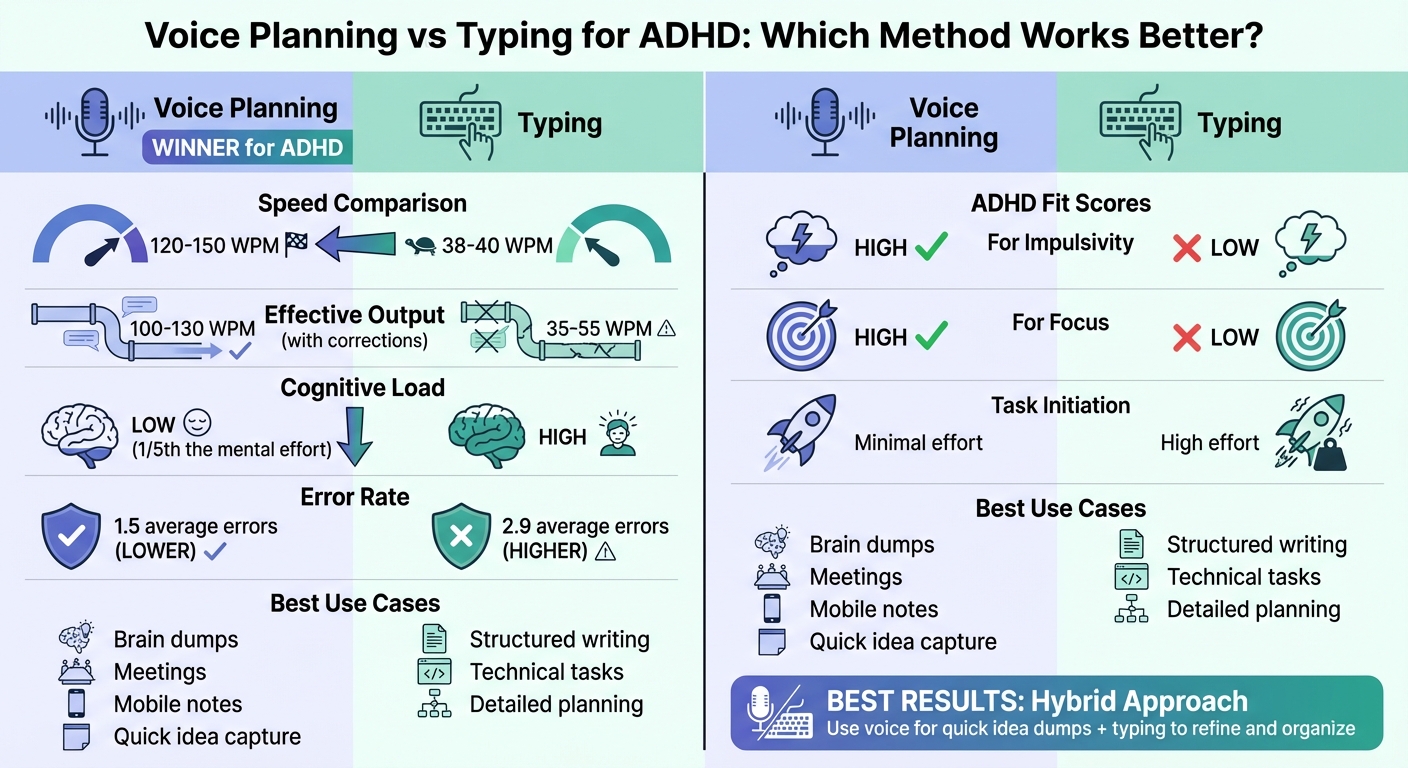
Voice Planning vs Typing for ADHD: Speed, Accuracy, and Cognitive Load Comparison
5 Game-Changing Productivity Apps For ADHD
sbb-itb-1b3be24
What Is Voice Planning?
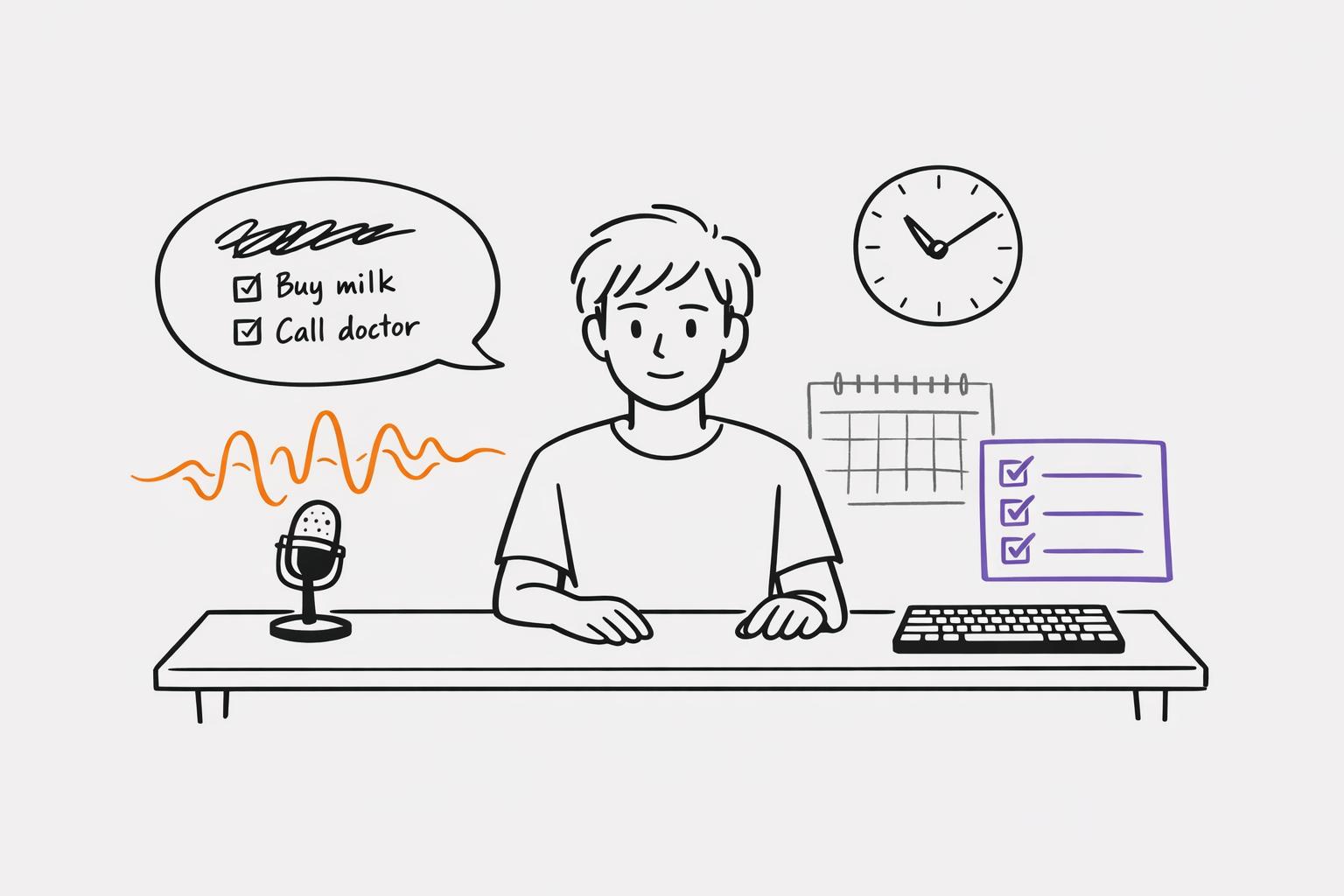
Voice planning is all about using voice-to-text technology to turn your spoken thoughts into organized tasks, schedules, and plans. Instead of typing everything out, you just speak, and the system transforms your words into an actionable to-do list.
Calma takes this concept a step further by integrating AI. It doesn’t just transcribe your words - it organizes tasks, sets priorities, identifies due dates, and even tracks how your mood might influence your planning habits. Using it is straightforward: open the app, hit record, and speak. For example, you might say, "I need to email Sarah by Friday, pick up groceries, and call the dentist next week." The AI breaks this down into separate tasks, assigns deadlines, and slots everything into your planner - all without you lifting a finger.
"Voice-to-text planning bridges this gap by letting your strongest communication channel do the heavy lifting." - Allen, AFFiNE
This method is particularly helpful for people with ADHD, whose fast-moving thoughts often outpace their ability to type. It removes the barriers of formatting, spelling, and typing, allowing you to capture ideas as naturally as you think them. This not only speeds up task management but also addresses some of the key challenges associated with ADHD.
How Voice Planning Helps ADHD
Voice planning tackles several ADHD challenges by leveraging the natural speed of speech. For those prone to "thought leakage", where ideas vanish as quickly as they appear, this approach ensures thoughts are captured on the spot.
One of its greatest strengths is its ability to combat task initiation paralysis. Recording a thought takes less than two seconds, making it easier to act before the idea slips away. This instant capture feature can be a game-changer for ADHD brains.
It also lightens the mental load. Typing requires you to translate ideas into text, coordinate finger movements, and manage formatting. Speaking, on the other hand, lets the AI handle all of that, freeing your mind to focus on the actual tasks.
Interestingly, speaking your plans aloud can also help jumpstart action. When you vocalize your intentions, it activates various brain regions - like those responsible for auditory, motor, and language processing - which can help shift you from thinking about tasks to actually doing them.
For those who struggle with time blindness, voice planning externalizes time. Saying something like, "I’ll work on the report for 30 minutes starting at 2:00 PM", makes time feel more tangible and manageable instead of abstract and overwhelming.
Downsides of Voice Planning
While voice planning has clear benefits, it’s not without its challenges. One major issue is accuracy. Background noise, like conversations or appliance sounds, can significantly reduce how well the system understands you. In a quiet environment, tools like Microsoft Word’s Dictate can achieve up to 99% accuracy, but that performance dips when there’s noise.
Privacy is another concern. Speaking your tasks aloud in shared spaces or public areas can expose personal details to those nearby. A survey of ADHD professionals found that 77% consider privacy a critical feature for voice-planning tools. While some apps offer features like whisper-level capture, these aren’t universal, and even speaking softly may not always feel secure.
There’s also the reliance on technology to consider. For people with ADHD, who often struggle with maintaining backup systems, a device malfunction, dead battery, or an environment where speaking isn’t feasible can disrupt their entire planning process.
Finally, there’s the awkwardness factor. Talking to a device about your tasks can feel strange, especially at first. Learning how to phrase commands so the AI understands you - like using terms such as "priority" or "parking lot" for categorization - can add an initial learning curve that might discourage some users from sticking with it long enough to see the benefits.
What Is Typing-Based Planning?
Typing-based planning involves manually entering your tasks, deadlines, and notes into ADHD productivity planner app options like spreadsheets, calendars, or note-taking apps. It’s all about typing out each detail, organizing them into categories, and shaping your schedule one keystroke at a time. Unlike voice planning, which captures thoughts almost instantly, typing slows the process down, which can actually be helpful for ADHD users when used effectively.
This method taps into several key areas of executive functioning - task initiation, working memory, impulse control, and sustained attention. To put it into perspective, the average typing speed is roughly 40 words per minute, while ADHD thoughts can zip by at over 150 words per minute.
"Your thoughts move at 150+ words per minute while your fingers manage 40." - Lound.ai
This difference in speed forces you to slow down, turning rapid-fire ADHD thoughts into clear, sequential entries. That slower pace can feel grounding, helping to transform mental chaos into something more structured. Plus, the tactile act of typing engages parts of the brain tied to memory and cognitive processing, which might make the information stick better than if it were just spoken.
Calma supports this method with its digital tools, letting users manually input tasks, tweak details, and visually organize their schedules. Features like drag-and-drop functionality, color-coded priorities, and an at-a-glance weekly view offer the kind of structured control that many ADHD users find helpful. Up next, let’s dive into why this method works so well for ADHD minds.
How Typing Helps ADHD
Typing offers a sense of precision and control. As you type, you can edit and refine your thoughts, which makes it easier to catch mistakes before they cause problems. For ADHD users, who often struggle with impulsivity, this slower, more deliberate process can help curb rash decisions. The visual layout of digital tools adds another layer of support, creating what researchers call "visual scaffolding".
Features like color-coding tasks by urgency or breaking projects into smaller subtasks make it easier to stay focused. These tools reduce the ambiguity that often leads to overwhelm. By moving information from your head to a digital format, you also lighten the mental burden of trying to remember everything - a common challenge known as the "ADHD tax".
Breaking down big projects into smaller, actionable steps is another advantage of typing. Using frameworks like SMART goals (Specific, Measurable, Achievable, Relevant, Time-bound) can make even the most intimidating tasks feel manageable. For those who struggle to get started, typing out even the smallest action - like "open document" or "type title" - can serve as a helpful nudge. Digital planners also support time-blocking techniques, where you divide your day into focused segments. This approach reduces decision fatigue and helps maintain clear boundaries. But while typing has its benefits, it’s not without its challenges.
Downsides of Typing for ADHD
Typing can be mentally taxing. It requires you to juggle multiple tasks at once: remembering what you need to do, organizing your thoughts, coordinating fine motor skills, and staying focused - all while resisting distractions. For many ADHD users, this level of multitasking can feel overwhelming.
"ADHD is not a disorder of knowing what to do, but of doing what you know." - Dr. Russell Barkley, ADHD Researcher
Another common hurdle is blank page syndrome. Staring at an empty planner and figuring out where to start can lead to avoidance or a complete mental block. Unlike voice planning, where you can quickly dump your thoughts and sort them later, typing often requires you to organize your ideas before they even make it onto the page.
The mismatch between how quickly you think and how slowly you type can also be frustrating. ADHD brains often race ahead of their hands, making the process feel tedious. On top of that, impulsivity and inattention can lead to typing mistakes - like swapped letters, missing characters, or inconsistent punctuation. Fixing these errors can interrupt your flow and eat up valuable time.
Finally, typing demands sustained focus. You need to stay locked in on the screen, resist the temptation to open distracting tabs (a trap often called the "rabbit-hole trap"), and concentrate long enough to finish your entries. For ADHD minds, which crave novelty and struggle with prolonged focus, this can feel like a constant uphill climb.
Voice Planning vs Typing: Direct Comparison
When it comes to voice planning versus typing, the differences are more than just about speed - they shape how your ADHD brain works through ideas, handles mental effort, and translates intentions into actions.
Voice planning keeps up with the rapid pace of your thoughts. Speaking allows you to capture ideas at a rate of 120–150 words per minute, making it easier to hold onto those fleeting, interconnected ideas before they disappear. Typing, on the other hand, slows this process down, increasing the risk of losing key thoughts.
Another major advantage of voice planning is its reduced cognitive load. It uses about one-fifth of the mental effort compared to typing, as it skips over the need to juggle multiple executive functions, especially in everyday planning. For the 75% of ADHD individuals who process information verbally, speaking serves as a kind of "cognitive scaffolding", helping to support and organize thoughts. These differences also play a role in how accurately each method captures your ideas.
"Speaking is more than a writing aid - it becomes an executive function support tool that bridges the gap between intention and action." - AFFiNE
When comparing error rates, voice planning again shows an edge. Dictated notes average 1.5 errors, compared to 2.9 errors for typed notes. Speech recognition also boasts a 20.4% lower error rate for English compared to typing. Even when factoring in correction time, voice dictation delivers an effective output of 100–130 words per minute, far outpacing typing’s 35–55 words per minute.
Comparison Table: Voice vs Typing
| Factor | Voice Planning | Typing-Based Planning |
|---|---|---|
| Speed | 120–150 WPM | 38–40 WPM |
| Effective Output | 100–130 WPM (with corrections) | 35–55 WPM (with corrections) |
| Task Initiation | Minimal effort; primes behavior | High effort; can lead to delays |
| ADHD-Fit: Impulsivity | High; captures fast thoughts | Low; thoughts may be lost |
| ADHD-Fit: Focus | High; engages multiple senses | Low; blank screens can overwhelm |
| Cognitive Load | Low; uses less mental energy | High; demands more effort |
| Error Rate | Lower (avg. 1.5 errors) | Higher (avg. 2.9 errors) |
| Best Use Case | Brain dumps, meetings, mobile notes | Structured writing, technical tasks |
This side-by-side comparison highlights how voice planning aligns better with the needs of ADHD brains, offering a faster, less demanding, and more accurate way to capture and process ideas. Typing still has its place, particularly for tasks that require precision and structure, but for unfiltered brainstorming or on-the-go planning, voice input is hard to beat.
How Calma Supports Both Planning Methods for ADHD
Calma is designed to work with the ebb and flow of ADHD needs. Some days, quick voice input might be your go-to; other days, you may prefer the precision of typing. The app’s hybrid design allows you to seamlessly switch between these methods based on your energy, environment, or the task at hand.
Using Calma's Voice and Typing Features
With its voice-to-task conversion feature, Calma transforms your rapid thoughts into organized, prioritized tasks. This means you can simply speak your ideas - whether during your morning coffee or while commuting - and let the app handle the rest. It identifies tasks, detects deadlines, and slots them into your planner. When you need more control or detail, you can switch to manual entry for precise planning.
The app also includes calendar integration, ensuring your tasks and events stay in sync, and emotion tracking, which uses both voice and manual journal entries to help you monitor mood trends. These features lighten the mental load by automating organization and tracking. Additionally, habit widgets provide a visual snapshot of your progress, showing streaks at a glance - whether you logged habits via voice or manually checked them off.
This dual functionality means you’re never locked into one method. Use voice for brain dumps when your thoughts are racing, then refine those tasks with typing when you need more structure. Calma adapts to your ADHD brain in real time, not the other way around.
And if flexibility in planning isn't enough, Calma also offers pricing options tailored to different needs.
Calma Pricing Plans
Calma provides four pricing plans, ensuring there’s something for everyone. The Grace Period offers new users 7 days of full access to voice AI features at no cost, giving you a chance to see how the app fits into your routine. After that, the Free plan remains available for manual task creation and habit tracking, though voice AI features are locked.
For users seeking the full suite of tools, the Pro Weekly plan costs $2.00 per week, unlocking unlimited voice-to-task conversion, calendar integration, iOS widgets, and unlimited habit tracking. For long-term users, the Pro Annual plan is priced at $39.99 per year, offering the same features at a lower rate - ideal for consistent ADHD management.
| Plan | Price | Key Features | Best For |
|---|---|---|---|
| Grace Period | $0 (7 days) | Voice AI, task extraction, journal processing, up to 3 habits | Testing if Calma fits your workflow |
| Free | $0 | Manual tasks, manual journal entries, up to 3 habits, all color themes | Casual users with minimal task volume |
| Pro Weekly | $2/week | Unlimited voice AI, calendar sync, iOS widgets, unlimited habits | Short-term organization or flexible billing |
| Pro Annual | $39.99/year | All Pro features at a discounted rate | Long-term ADHD management and routine building |
Whether you’re just exploring voice planning or ready to commit to a year of structured support, Calma’s pricing options are designed to meet you where you are on your productivity journey.
Conclusion: Choosing Your Planning Method
When it comes to planning with ADHD, the best method is the one that works with your brain's natural tendencies. There’s no one-size-fits-all answer between voice and typing - it all depends on how you process and organize information.
Voice planning is great for quickly capturing fleeting thoughts before they disappear, making it a strong choice for those with fast-moving, impulsive ideas. On the other hand, typing offers structure and precision, which can be helpful for tasks that require detailed organization. Plus, the physical act of typing can aid memory and focus for some people with ADHD.
For many, a hybrid approach works best: using voice to capture scattered ideas during moments of mental chaos, then switching to typing to refine and structure those thoughts. This aligns with findings that 75% of ADHD clients are verbal processors - using speech as a way to externally process thoughts - while still benefiting from the clarity that comes with manual input.
Ultimately, the choice between voice and typing should fit your workflow and adapt to your needs. Try experimenting with Calma's 7-day Grace Period, which gives you access to voice-to-task conversion and AI journal tools. This lets you test both methods and see if syncing your input style with your thought process reduces mental strain. Remember, your method doesn’t have to stay fixed - it can shift depending on your mood or the task at hand.
FAQs
How do I choose voice planning vs typing for my ADHD?
When choosing between voice planning and typing, think about what works best for your mental workflow. Voice planning can be quicker and less restrictive, making it a great option if your thoughts are coming in fast or if starting tasks feels overwhelming. On the other hand, typing provides more structure and accuracy, though it might feel slower or harder to get going at first. For many, blending the two methods offers the best of both worlds - speed and organization - helping address ADHD-related hurdles like staying focused and getting started.
What’s the best hybrid workflow for voice-to-text and typing?
The most effective hybrid workflow blends voice dictation and typing, making the most of their individual strengths. Voice input works great for quickly capturing ideas, brainstorming sessions, or drafting content - it’s faster and helps reduce mental fatigue. On the other hand, typing is better suited for tasks that require precision, such as editing or creating detailed notes.
Switching between these methods can boost your productivity by balancing speed and accuracy. This approach is especially helpful for managing ADHD-related productivity challenges, as it keeps the workflow dynamic and focused while maintaining clarity.
How can I use voice planning without privacy issues?
To keep your privacy intact, opt for speech-to-text apps that handle audio processing directly on your device rather than relying on cloud servers. This approach keeps your voice data secure and minimizes risks like data being stored or misused. Focus on apps with transparent privacy policies that highlight local data processing. If safeguarding your privacy is a top concern, steer clear of cloud-based services.