How to Prioritize Tasks When Everything Feels Urgent
- Prioritizing When Everything Feels Urgent for the Busy Adult with ADHD
- Step 1: Make Your Tasks Visible
- Step 2: Use the Eisenhower Matrix to Make Quick Decisions
- Step 3: Break Tasks into Time Blocks and Small Steps
- Step 4: Let AI Help You Prioritize
- Step 5: Use "What's on Fire?" and the Two-Minute Rule
- Create Your Daily Prioritized Workflow
- Conclusion: Regain Control of Your Time and Energy
- FAQs
When everything feels urgent, prioritizing tasks can feel impossible - especially if you struggle with ADHD. Your brain may treat every notification, deadline, or errand as equally critical, leaving you stuck in a reactive loop. But with the right strategies, you can regain control and focus on what truly matters. Here’s how:
- Make tasks visible: Use tools like digital planners, Kanban boards, or color-coding to keep tasks front and center. ADHD brains benefit from externalizing tasks to reduce mental clutter.
- Sort tasks with the Eisenhower Matrix: Categorize tasks by urgency and importance to identify what to do now, schedule for later, delegate, or eliminate.
- Time block your schedule: Assign tasks to specific time slots based on your energy levels, using shorter blocks for simpler tasks and longer ones for deep focus.
- Break tasks into small steps: Divide large projects into manageable actions to make starting easier and reduce overwhelm.
- Leverage AI tools: Apps like Calma can organize tasks, prioritize based on urgency, and even track your mood to suggest adjustments.
- Use quick-win methods: Apply the Two-Minute Rule for small tasks and focus on “on fire” tasks with real consequences today.
These approaches help you work with your brain’s strengths, simplify decision-making, and create a system that turns chaos into action. Start by trying one or two methods and build from there.
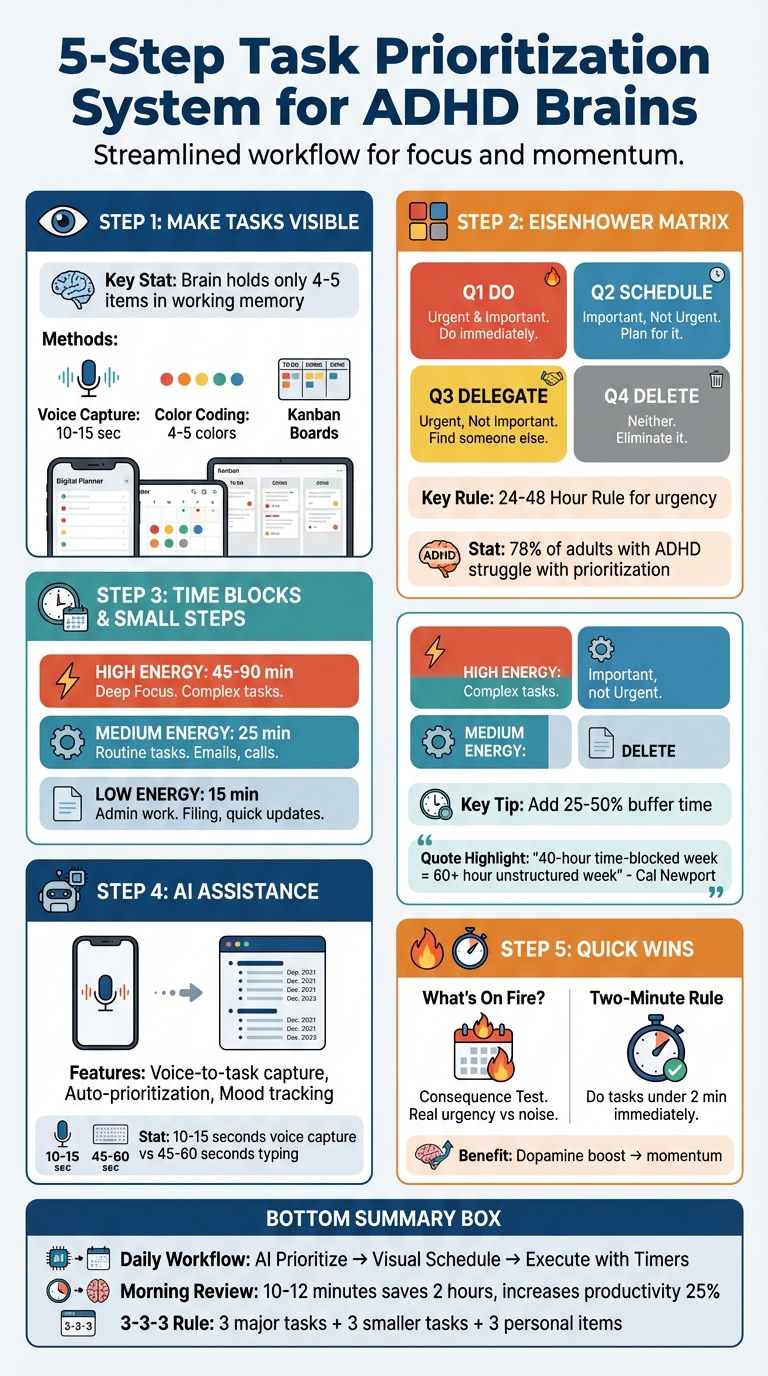
5-Step Task Prioritization System for ADHD Brains
Prioritizing When Everything Feels Urgent for the Busy Adult with ADHD
Step 1: Make Your Tasks Visible
Your brain can only manage 4–5 items in working memory at a time. Trying to juggle multiple tasks forces constant focus shifts, which drains your mental energy. A visual task system acts as an external memory, allowing you to see everything at once without overloading your brain.
For individuals with ADHD, there’s an extra hurdle: tasks that aren’t visible can easily slip away and be forgotten. By externalizing your tasks, you reduce mental clutter and create a system that helps you prioritize, even when things feel overwhelming. Whether you prefer digital tools or physical setups, keeping tasks visible ensures they don’t vanish into the background.
Use Digital Tools for Task Management
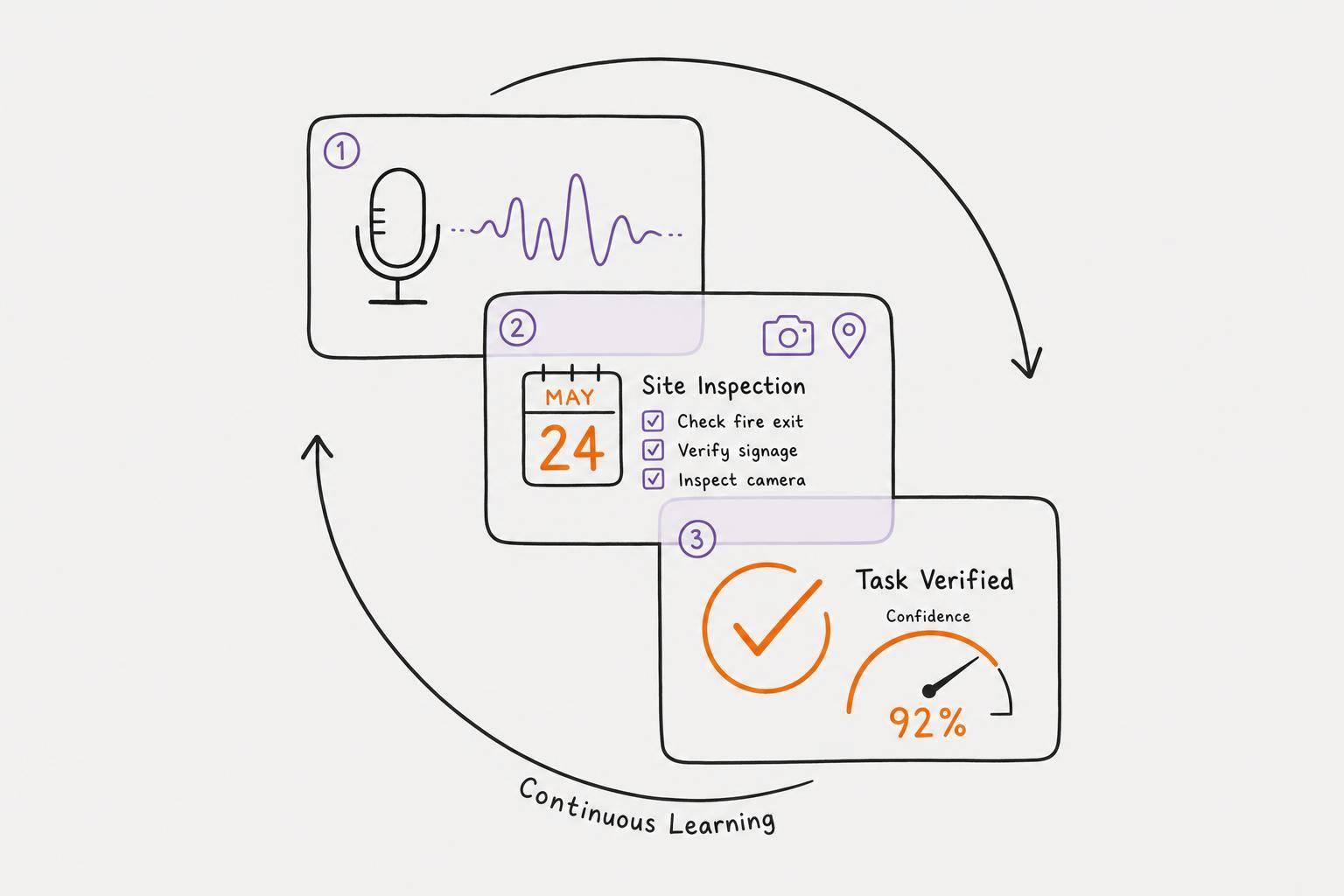
One of the quickest ways to offload tasks from your mind is through voice capture. Tools like Calma can convert voice inputs into structured, prioritized tasks in just 10–15 seconds - much faster than the 45–60 seconds it takes to type them manually. Simply speak your thoughts, and the tool organizes them instantly. This speed is crucial for ADHD brains, which need to capture ideas the moment they arise to avoid losing them.
Try Color Coding or Kanban Boards
Color coding taps into the brain’s ability to quickly recognize colors, cutting down on mental effort. By categorizing tasks with 4–5 colors, you can instantly identify their type without reading through details. For example, you might use Blue for Deep Focus, Orange for Collaboration, Gray for Routine, and Green for Learning.
Kanban boards provide a visual representation of your workflow. Moving tasks from "To Do" to "Doing" to "Done" not only organizes your progress but also gives you a small dopamine boost each time you complete a card. If your board starts to feel overwhelming, consider using a "Today vs. Later" view. This approach limits visible tasks to 1–3 key priorities, helping to avoid the paralysis that comes with an endless to-do list.
"Traditional productivity systems are built for neurotypical executive function - trying to force-fit those methods is like trying to run Windows software on a Mac." - Brain.fm
With your tasks clearly laid out and organized, you’re set to determine which ones require immediate attention using tools like the Eisenhower Matrix.
Step 2: Use the Eisenhower Matrix to Make Quick Decisions
Deciding what to tackle first can feel overwhelming, especially if everything seems urgent. That’s where the Eisenhower Matrix comes in. It’s a simple tool that helps you sort tasks into four categories by answering two questions: Is it urgent? and Is it important? Urgent tasks demand immediate attention, while important tasks align with your long-term goals and values. This distinction is crucial because of the "mere-urgency effect", which explains why our brains often prioritize immediate deadlines, even when other tasks might offer bigger rewards over time.
"I have two kinds of problems, the urgent and the important. The urgent are not important, and the important are never urgent."
For individuals with ADHD, this matrix can be a lifesaver. It takes the mental load off by externalizing decisions, replacing the chaos of juggling priorities in your head with a clear visual system. Research shows that effective time management leads to better job performance, academic success, less stress, and improved overall well-being.
How to Use the Eisenhower Matrix with ADHD
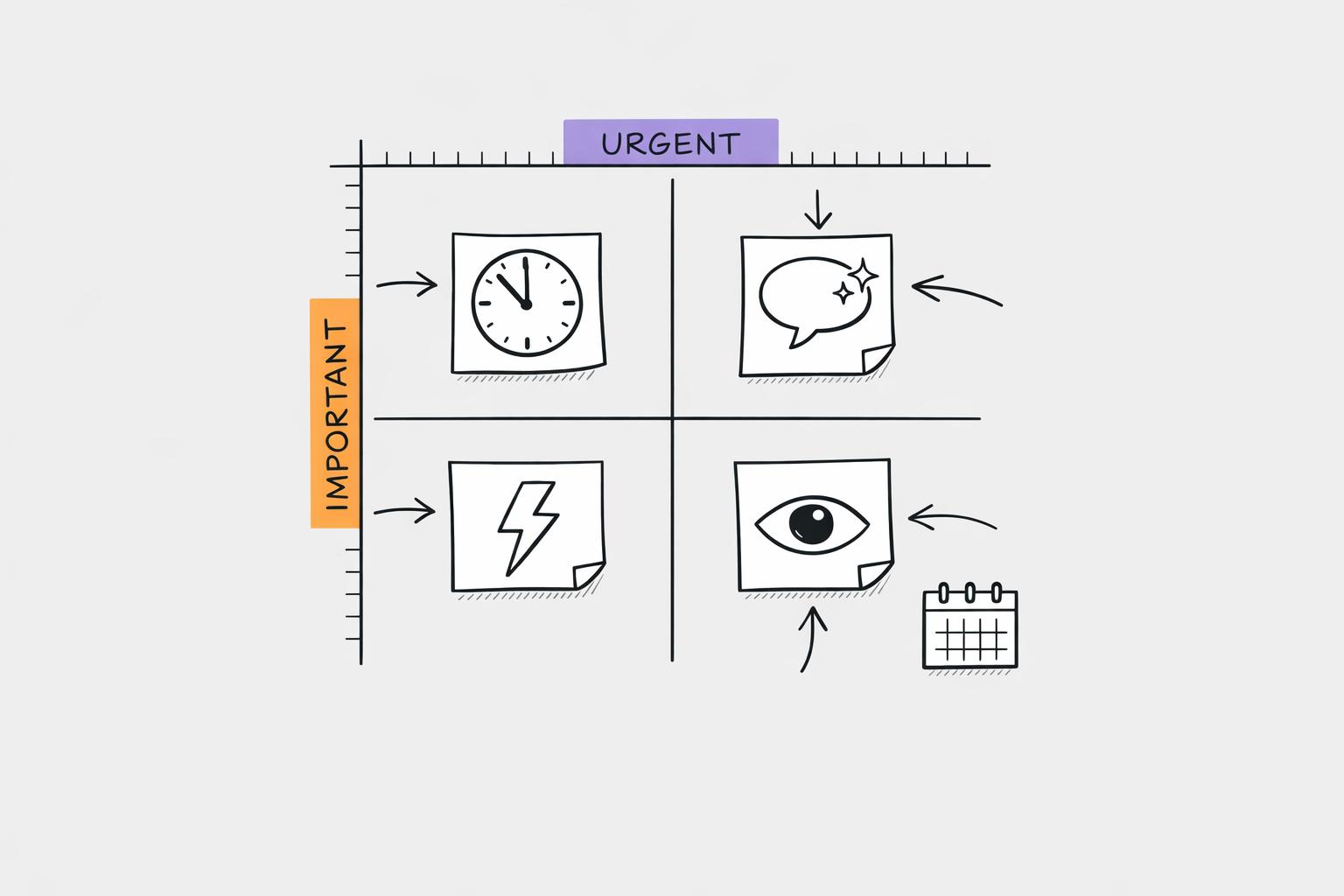
The matrix splits tasks into four quadrants:
- Q1 (Do): Urgent and important (e.g., a project due tomorrow).
- Q2 (Schedule): Important but not urgent (e.g., exercising or learning a new skill).
- Q3 (Delegate): Urgent but less important (e.g., routine emails).
- Q4 (Delete): Neither urgent nor important (e.g., endless social media scrolling).
Start by doing a brain dump - write down everything on your mind. Then, apply the Three-Test Filter to sort tasks:
- What happens if I don’t do this today?
- Will this matter in a month?
- Does this align with my goals or someone else’s?
Keep it manageable by limiting each quadrant to 3–5 tasks, or 10 at most. If you’re balancing work and personal responsibilities, try creating separate matrices for each area.
To make the process even easier, use visual cues. For example, assign warm colors like red or orange to urgent tasks, and cool tones like blue or green to important but non-urgent ones. You can also add an "interest level" indicator for tasks that require extra motivation, acknowledging that ADHD brains often thrive on interest rather than traditional importance.
| Quadrant | Action | ADHD Example |
|---|---|---|
| Q1: Urgent & Important | Do immediately | Project due tomorrow, medical emergency |
| Q2: Not Urgent & Important | Schedule for later | Exercise, planning, skill-building |
| Q3: Urgent & Not Important | Delegate or automate | Routine emails, unnecessary meetings |
| Q4: Not Urgent & Not Important | Delete or eliminate | Mindless scrolling, busywork |
Speed Up Categorization
One challenge with the Eisenhower Matrix is spending too much time deciding where tasks belong. To avoid this, use the 24-48 Hour Rule: anything with a deadline in the next 24 to 48 hours - or with immediate consequences if delayed - is urgent. For importance, apply the One Month Test by asking if the task will matter in a month or a year.
Start by eliminating Quadrant 4 tasks right away to reduce clutter. Research shows that workplace interruptions happen about every three minutes, and it takes roughly 23 minutes to fully refocus afterward. Clearing out unnecessary tasks helps you stay on track.
If you’re stuck, consider using a decision tree or flowchart to simplify sorting. For example:
"Does it have a deadline within 48 hours? Yes → Is it aligned with my goals? Yes → Q1. No → Q3."
This method reduces the need to constantly re-evaluate and keeps you moving forward.
"ADHD is, at its heart, a blindness to time. Or, to be more accurate, nearsightedness to the future."
- Dr. Russell Barkley, Clinical Psychologist
Because ADHD often makes everything feel urgent due to time blindness, clear rules like the 48-hour guideline are essential. The matrix helps make future deadlines visible and concrete, so important tasks don’t get overlooked.
With your tasks categorized, the next step is turning those priorities into actionable schedules.
Step 3: Break Tasks into Time Blocks and Small Steps
Now that you've sorted your tasks using the Eisenhower Matrix, the next step is figuring out how to get them done. This is where time blocking and breaking tasks into smaller, manageable steps come into play - especially for ADHD brains, which often struggle to kickstart larger projects.
Time blocking involves assigning specific tasks to fixed time slots in your schedule. Instead of juggling a never-ending to-do list, you commit to working on a task during a set period (e.g., "I'll tackle this report from 10:00 AM to 10:45 AM"). This approach helps make time feel more tangible and reduces the mental load of constant decision-making.
"A 40-hour time-blocked work week produces the same amount of output as a 60+ hour work week pursued without structure."
- Cal Newport, Author of Deep Work
For those with ADHD, shorter time blocks can be especially effective. Research suggests that working in 15–30 minute intervals reduces mental fatigue and makes tasks feel less daunting. Pair this with breaking larger tasks into smaller steps, and you'll find it much easier to get started and maintain focus.
Time Blocking for ADHD: Creating Realistic Schedules
Time blocking ensures every task - across all Eisenhower Matrix quadrants - gets the attention it needs. However, one common mistake is underestimating how long tasks will take, a challenge that’s amplified by ADHD-related time blindness.
To address this, build in a buffer of 25–50% more time than you initially estimate. For example, if you think a task will take 30 minutes, block off 45 minutes instead. This cushion allows for unexpected delays and keeps your schedule on track.
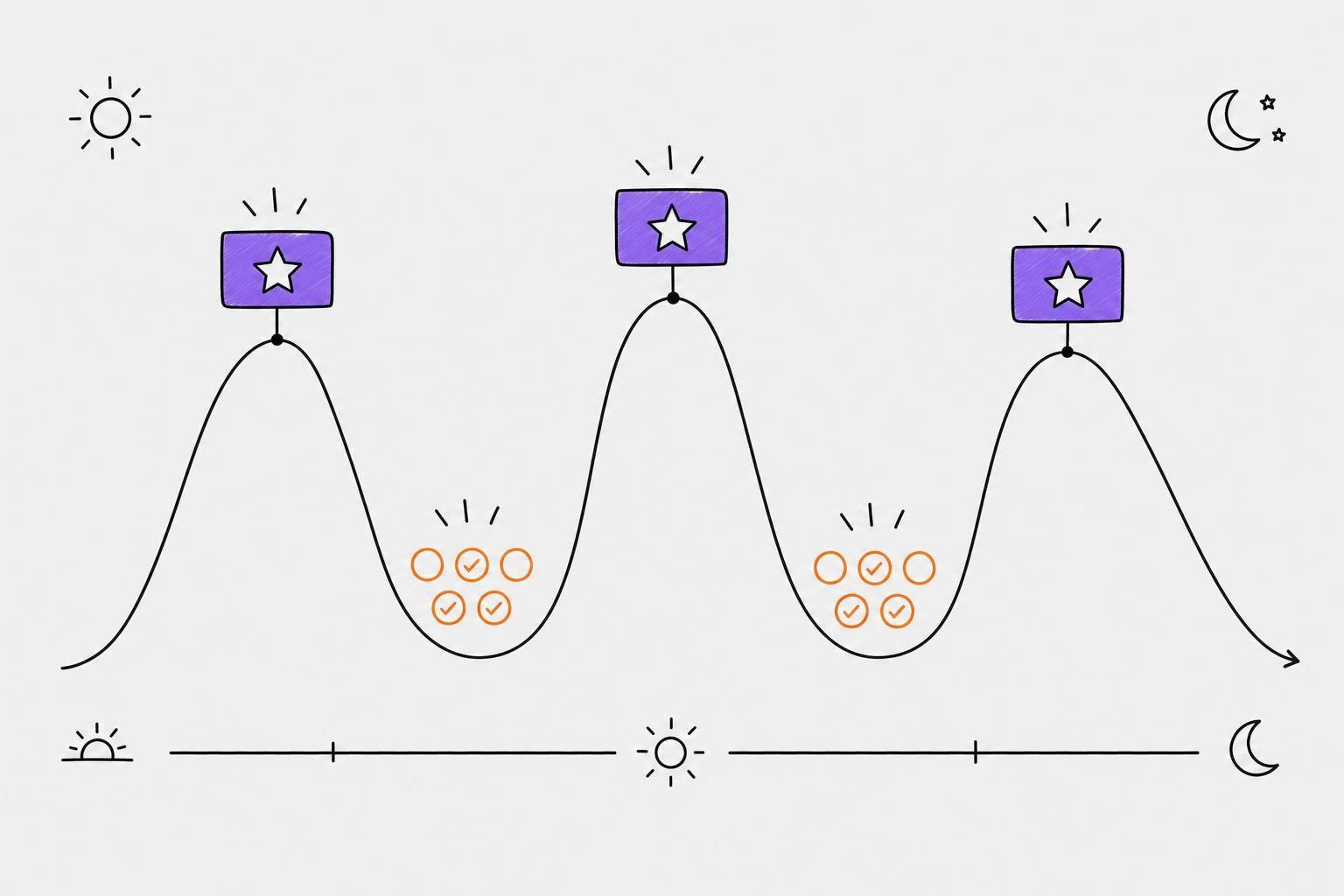
Align your time blocks with your energy levels. Reserve your most productive periods for 45–90 minute "Deep Focus" sessions, and use shorter 15-minute blocks for simpler tasks like emails or filing. To make your schedule even more intuitive, try color-coding your blocks by task type. For instance:
- Red: Deep Focus tasks
- Green: Administrative work
- Yellow: Creative projects
- Blue: Learning activities
- Purple: Personal time
This visual system makes it easier to see how your day is structured at a glance, reducing the mental effort needed to plan or adjust.
Don’t forget to include short transition rituals between time blocks, like taking five minutes to stretch, clear your workspace, or breathe deeply. These mini-breaks help your brain shift gears, which is particularly helpful for neurodivergent individuals. Using visual timers can also make time feel more concrete, helping you stay aware of how much time has passed.
| Energy State | Block Length | Task Type Examples |
|---|---|---|
| High Energy | 45–90 minutes | Creative work, strategic writing, coding |
| Medium Energy | 25 minutes | Routine tasks, meetings, reviews |
| Low Energy | 15 minutes | Emails, admin work, basic updates |
| Crashed | 5 minutes | Minimum effort tasks or rest breaks |
Once your schedule is visually mapped out, the next step is to make big projects feel less overwhelming.
Breaking Big Tasks into Bite-Sized Steps
Large tasks can feel paralyzing, often leading to procrastination. The solution? Break them into tiny, actionable steps that take less than 30 minutes each. Each step should have clear criteria for completion. For example, instead of "Plan marketing campaign", you could divide it into:
- Research three competitor campaigns (15 minutes)
- Write draft email subject lines (20 minutes)
- Outline a social media calendar (25 minutes)
To build momentum, start with a quick, easy win - something you can finish in five minutes. This small success can boost dopamine levels, making it easier to transition into a more challenging 25-minute task.
Using "if-then" planning can also help reduce decision fatigue. For instance, say to yourself, "If it’s 10:00 AM, then I will open the project file." This removes the need to decide what to do when it’s time to start.
Before diving into any time block, define what "done" looks like for that task. This prevents perfectionism and hyperfocus on unnecessary details. For example, you might decide, "Done means writing a 200-word introduction with three main points." Once you meet that goal, move on.
If your schedule starts to slip, try a 15-Minute Reset. Set a timer and tackle a small task - like clearing five emails or updating your calendar - to regain momentum.
With your time blocks and micro-steps in place, you're now ready to explore how AI tools can further optimize your workflow.
sbb-itb-1b3be24
Step 4: Let AI Help You Prioritize
Managing tasks can be overwhelming, especially when you're juggling multiple priorities and trying to avoid mental overload. If you've already organized your tasks visually, sorted them using the Eisenhower Matrix, and broken them into time blocks, you’re off to a solid start. But what if you could take the mental strain out of deciding what to tackle first? That’s where AI-powered tools step in, simplifying the process and reducing decision fatigue - something that can be especially helpful for ADHD brains.
Traditional task management often demands constant decision-making: Which task is most important? What’s the deadline? Can this wait? For those who struggle with prioritization, these questions can quickly drain mental energy. AI tools offer a solution by analyzing patterns in your tasks, such as urgency, deadlines, and even your emotional state, to suggest what to focus on next. This data-driven approach removes the guesswork and helps you get started without overthinking.
Voice-based AI planners are particularly useful - they can capture your thoughts in just 10–15 seconds and handle the task ranking for you, saving time and reducing the manual effort of organizing.
How Calma Simplifies Prioritization
Calma is a game-changer when it comes to turning scattered thoughts into actionable tasks. Its voice-to-task feature allows you to quickly record tasks and deadlines without lifting a pen or typing. For instance, if you say, “I need to finish the client proposal by Friday and email Sarah about the budget,” Calma will automatically create two tasks with deadlines and relevant context.
What makes Calma stand out is its smart prioritization feature. It picks up on urgency cues in your language - phrases like “ASAP” or “urgent” immediately push those tasks to the top of your list. This approach aligns with the INCUP framework, which highlights that ADHD brains are more responsive to Interest, Novelty, Challenge, Urgency, and Passion rather than abstract ideas of importance. By creating immediate deadlines and reminders, Calma helps spark the motivation you need to take action.
Additionally, the app’s daily planner view consolidates all your tasks into one screen, so you’re not constantly flipping between apps, notebooks, or sticky notes. Widgets that track your habits and task progress provide real-time visual feedback, reinforcing your momentum and keeping you on track.
Track Your Emotions and Adjust Priorities
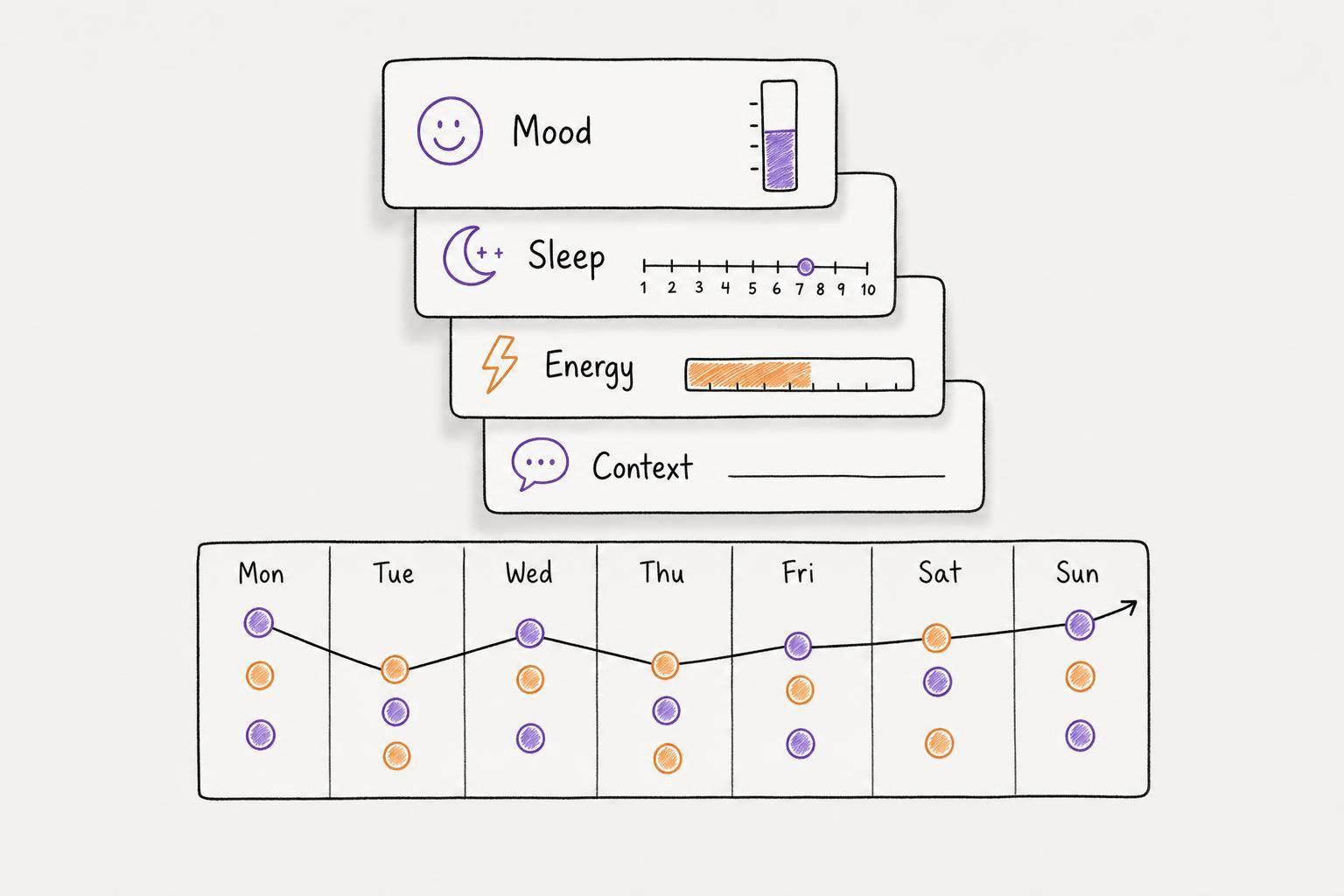
Tasks aren’t just about deadlines - they’re also influenced by how you’re feeling. Calma goes beyond simple task sorting by factoring in your emotional state. Its voice-to-text journaling and emotion detection features let you log your mood, capturing emotional cues from your voice entries and tracking trends over time.
For example, if you’re feeling anxious or drained, Calma can suggest adjusting your priorities to match your current energy levels. Instead of pushing through a cognitively demanding task when you’re running on empty, you can shift to lighter activities, like organizing emails or updating your calendar. This flexibility ensures you’re working with your brain, not against it.
Over time, this emotional tracking creates a feedback loop. By identifying patterns in your mood and productivity, you can learn which types of tasks are best suited to different mental states. This helps you plan schedules that are not only realistic but also sustainable.
| Feature | Calma (AI/Voice) | Traditional Planners |
|---|---|---|
| Capture Speed | Rapid (natural speech) | Slower (manual input) |
| Cognitive Load | Low | Moderate to high |
| Prioritization | Automated/AI-assisted | Manual (requires effort) |
| Emotional Context | Built-in mood tracking | Rarely included |
| Feedback Loop | Instant (visual streaks) | Delayed (manual check-offs) |
Step 5: Use "What's on Fire?" and the Two-Minute Rule
Now that you have automated systems suggesting priorities, it's time to quickly sort true emergencies from distractions. This is where the "What's on Fire?" method and the Two-Minute Rule come in handy. These tools work together to help you focus on what really matters - one identifies actual crises, while the other clears away minor tasks that cloud your focus.
Spotting and Tackling "On Fire" Tasks
Not every task that screams for your attention is genuinely urgent. Some are just noisy - distracting but without real consequences. A true "on fire" task has immediate, tangible repercussions if left undone today.
"Urgency bias in ADHD feels a bit like having a smoke alarm that goes off not just for fires, but for warm toast, a slightly enthusiastic shower, or someone saying your name from another room." - Dana Dzamic, ADHD Insight Hub
To separate the real fires from the false alarms, try the Consequence Test: Ask yourself, "What happens if I don't do this today?". If the answer doesn’t involve a missed deadline, a lost chance, or harm to a relationship, it’s likely not urgent - it’s just loud.
Think of it this way: urgent tasks are like a crying baby, demanding immediate attention. Important tasks, on the other hand, are like your health - quiet but essential. If you only respond to the crying, you risk neglecting what keeps your life steady in the long term. Focus on tasks that, when completed today, will create a positive impact next week or even next quarter - not just reduce your stress for the moment.
While AI tools can help rank tasks by urgency, your own judgment is key to fine-tuning this process. ADHD often makes all tasks feel like they exist in a "now-ish" time frame, which explains why nearly 78% of adults with ADHD struggle with prioritization. The Consequence Test helps cut through this fog. Once you’ve identified the real emergencies, you can move on to clearing the smaller distractions.
Using the Two-Minute Rule for Quick Wins
After pinpointing your "on fire" tasks, you might still feel stuck, especially if they seem overwhelming. That’s where the Two-Minute Rule can save the day. Popularized by David Allen in Getting Things Done, this rule is simple: if a task takes two minutes or less to complete, do it right away.
This strategy helps eliminate the "loud" tasks that clutter your mind. Quick emails, filing papers, or sending calendar invites might feel urgent because they’re distracting, not because they’re critical. Handling them immediately prevents them from masquerading as priorities.
But there’s an added bonus: the Two-Minute Rule can break through task paralysis. Completing a small task gives your brain a shot of dopamine, which can jumpstart your motivation. It’s like warming up before a workout - you’re not avoiding the big stuff; you’re gearing up for it.
Here’s how to combine both methods: When overwhelmed, do a quick audit of your to-dos. For each task, ask, "Will something bad happen if I don’t do this today?". Sort tasks into Urgent (real consequences) or Loud (emotionally distracting but not critical). Start with one "on fire" task, then tackle a two-minute "loud" task as a mental reset. Alternating between a crisis task and a quick win helps you maintain momentum.
If starting an "on fire" task feels too intimidating, flip the order: knock out a two-minute task first, then dive into the critical work while riding the dopamine wave. This approach works because the ADHD brain thrives on triggers like Interest, Novelty, Challenge, Urgency, and Passion (INCUP). By stacking small wins, you align with how your brain naturally operates, making productivity feel less like a battle and more like a rhythm.
Create Your Daily Prioritized Workflow
You've explored individual strategies like visual tools, time blocks, the Eisenhower Matrix, AI support, and quick-win tactics. Now it’s time to combine them into a daily routine that adjusts as priorities shift. The aim isn’t perfection - it’s about building a system that works with your brain.
Combine Visual Tools, Time Blocks, and AI Support
This workflow is designed to bring together time-blocking and AI-supported prioritization into a seamless daily routine. Start by letting AI handle the initial workload. For instance, use tools like Calma to capture tasks via voice and automatically organize them. This eliminates the early-day decision fatigue that can drain mental energy. After the AI organizes your tasks, transfer them to a color-coded calendar for clarity.
Color codes can help visually separate tasks. For example:
- Red blocks for high-focus work requiring deep concentration
- Green blocks for routine admin tasks like emails and calls
- White blocks for buffer or transition time
Instead of scheduling tasks solely based on urgency, align high-concentration work with your natural energy peaks. To account for distractions and transitions, pad each task estimate with an extra 25–50% of time.
Incorporate 5-minute transition rituals between tasks. These could include:
- Saving your work
- Clearing your desk
- Taking a deep breath
- Setting up for the next task
These brief breaks help ease context switching and reduce burnout. For Deep Focus blocks, set "hard stop" alarms every 90 minutes to prompt transitions effectively. The workflow becomes: Prioritize with AI → Schedule with visual time blocks → Execute with timers and transitions. This approach distributes cognitive load, allowing your brain to focus on the tasks at hand.
| Workflow Step | Tool Type | Benefit |
|---|---|---|
| Prioritize | AI Sorting | Reduces decision fatigue; uses clear frameworks |
| Schedule | Visual Time Blocks | Makes time feel more concrete |
| Execute | Visual Timers/Body Doubling | Adds urgency and external accountability |
Once your schedule is in place, a quick daily review ensures your priorities remain aligned.
Review and Adjust Your Priorities Daily
This structure works best with regular fine-tuning. Spend 10 minutes each morning reviewing and adjusting your priorities. Avoid lengthy planning sessions, which can feel productive but often lead to procrastination. Studies suggest that 10–12 minutes of focused morning planning can save up to 2 hours of wasted time and increase productivity by 25%.
Start your morning review with a quick brain dump of everything on your mind. Then, use the "Now and Not Now" filter to separate tasks into what must be done today and what can wait. Apply the 3-3-3 Rule to structure your day:
- 3 major tasks: High-impact work
- 3 smaller tasks: Admin or maintenance work
- 3 personal items: Activities for your well-being
This keeps your day manageable while ensuring all areas of your life get attention. Check in briefly at midday and late afternoon to assess progress on critical (Tier A) tasks and adjust as needed. If new urgent tasks arise, follow the "One-In, One-Out" Rule: only add a new task if you defer or remove an existing one. This prevents "priority creep" from overwhelming your schedule.
"The key is to not prioritize what's on your schedule, but to schedule your priorities." – Stephen Covey, The 7 Habits of Highly Effective People
On days when energy is low, simplify your routine with a Minimum Viable Routine (MVR). This pared-down version of your workflow might include just one Deep Focus block, one admin task, and one self-care activity. The system adjusts to your energy levels, keeping you consistent without pushing you toward burnout.
Conclusion: Regain Control of Your Time and Energy
The strategies outlined above are designed to turn overwhelming chaos into a structured, manageable routine. When everything feels urgent, it's often your brain misinterpreting distractions as critical tasks. These techniques help you step back, separate true priorities from mental noise, and create a workflow that aligns with how your brain operates, rather than fighting against it.
Start small - try one or two methods, like the Eisenhower Matrix or focusing on just two priority tasks each day. Stick with them for at least two weeks to see how they fit into your life. Avoid the temptation to overhaul everything at once. As Dr. Russell Barkley, a leading ADHD researcher, explains:
"The key to ADHD productivity isn't forcing yourself into neurotypical systems - it's finding approaches that harness your brain's unique strengths".
Consider using tools like Calma to simplify task organization and sorting. Combine this with visual time blocks, quick daily 10-minute reviews, and adopting the "Good Enough" principle to push back against perfectionism.
FAQs
How do I decide what’s truly urgent vs. just loud?
Not every urgent task deserves immediate attention. To sort through the noise, ask yourself a few key questions: Who finds this urgent - me or someone else?, What are the consequences if I don’t act right now?, and Does this task support my main goals? By categorizing tasks - such as distinguishing between urgent and important - you can concentrate on what truly matters and avoid making decisions driven by stress or outside pressure.
What should I do if my time blocks keep falling apart?
If traditional time blocking isn't working for you, it might be time to explore approaches better suited for ADHD. Consider breaking tasks into smaller, manageable pieces, using timers or visual reminders to stay on track, and trying flexible timeboxing methods that adjust to your focus and energy levels. Tools like Calma can also make a difference - they offer organizational systems designed to accommodate shifting attention and energy without relying on strict schedules.
How can I keep important tasks from getting ignored?
Keeping track of everything can feel overwhelming, but prioritization strategies like the Eisenhower Matrix make it easier. This method helps you categorize tasks based on their urgency and importance, so you can focus on what truly needs your attention.
Using visual task management systems or ADHD-friendly tools can also be a game-changer. These tools let you organize tasks in a way that’s clear and easy to follow. Plus, they help you stay on track without feeling swamped.
Another tip? Break down larger tasks into smaller, manageable steps. Tackling one small piece at a time makes even the most daunting projects feel doable. This approach not only reduces stress but also helps you stay focused on what matters most, even in high-pressure situations.